Showing posts with label Jessica Shutt. Show all posts
Showing posts with label Jessica Shutt. Show all posts
Tuesday, 14 April 2015


Question 4 - Evaluation
How did you use new media technologies in the construction and research, planning and evaluation stages?
Research and Planning
Google Blogger
In order to create our 5 minute film, we were required to do hours of research, planning and preparation to ensure that our film was to an excellent standard and produce the film to the best of our ability. Firstly, we set up a Google Blogger page so each member of the group could access each others work and contribute as a group. To make the blogger page more personal to the group, we changed the format and added our film little 'LOLA' to the background which allowed viewers to distinguish us from any other group. In order to familiarise our selves with the software we had a play around with the settings and also added a group picture which allowed others to identify us as a group and this ultimately allowed us to become more confident when using blogger.


Rotten Tomatoes & IMDb
Before creating our film, we were required to do in-depth research on other films with similar genres/plots/storylines/characters to ensure we has a good idea of what is expected from these types of films and also analyse the audience feedback submitted from reviews of similar films. This allowed us to get a rough idea of what the audience want to see in a film and therefore, what we should include in ours. When looking at film reviews, I frequently used the websites Rotten Tomatoes and also IMDb as they provided in-depth information about a variety of different films. I was also able to access the websites on a variety of different media platforms which was also very useful.

Celtx
When planning our film, we considered every small detail and ensured that we were organised in order to eventually carry out the filming. To create our script for our film, we used a software called Celtx. Celtx is media pre-production software, designed for creating and organizing media projects like screenplays, films, videos, stageplays, audio plays, documentaries, machinima, comics, games and podcasts. The software was fairly easy to use and allowed us to produce a detailed script for our film. The software included a variety of features which we added to our script, e.g. Character name, Location, Scene Number, Stage directions... We used the software last year when producing our AS media film therefore we felt a lot more confident when using it this year.
 Photoshop Elements
To create our film Logo 'Lantern Lights' and our film poster for our final film LOLA, we used Photoshop elements. Last year we didn't use Photoshop so we were all very new to the software and had very little experience using it. At fist we had difficulty as we were unsure of many of the features built into the programme. After playing around with the software for a couple of hours, we became a lot more confident using it and discovered that it had some really useful features. I particularly liked the feature which allowed us to alter the contrast, brightness and saturation of our background image for our film poster. This enabled us to create a film noir effect by dimming the lighting on one half of Lola's face and highlighting the other side. The effect this had foreshadowed the film plot and highlighted the main theme throughout our film which is the contrast of life and death.


Final Cut Express
Final cut express is a film editing software which we have used religiously throughout our film making process. We have not only used the editing software to edit our final film, but we have frequently used throughout our planning and preparation. For example, we used it when practicing our elliptical editing by filming a long journey from one place to another. We then edited the journey and reduced it by half of the original time and compared the two. We also used final cut express when practicing shots for our final film and we also created a short makeup tutorial for our characters in our film. Final cut express has many features which we have applied to our film in order to make it look more professional and of a higher quality.
Some of the video transitions which we have used in our film are; cross dissolve, fade in and fade out, dither dissolve and Non-adhesive dissolve. We have used these transitions mainly to establish a passage of time or to change scenes. The software also includes a variety of audio transitions which allowed us to ensure that the sound in our film matched up with each frame.
When using final cut express, we were also able to use the Text feature which enabled us to add credits, names to the opening sequence and the title 'LOLA'. We were able to chose the font, text size and positioning of the text in the film which allowed us to make it our own.
We were also able to import music and sound effects from various websites which we added to our film to mirror the mood in the film and create effects and set the atmosphere for the audience.
Not only did we use Final Cut Express for our film, but we also used it when creating our radio trailer. To do this we used snippets of dialogue and sound effects from our film, various music tracks included in the film and a narrative from myself and Demi. However, Demi played Hannah in the film, therefore the audience would be able to distinguish Demi's voice in the trailer which we thought may have been a problem as we didn't want the audience to identify her as she was advertising the film, not plating Hannah. To overcome this issue, we altered the Pitch and Tone of Demi's voice using the features on final cut express ultimately making her voice unrecognisable.
Youtube
To post all of our videos we used my account on Youtube. However, before we uploaded all our videos we had to export them from final cut express and convert them into another file. Sometimes this could take up to 1 hour therefore we had to arrive at our lessons quite early if we knew a video would need exporting as it would take it until the end of the lesson. Youtube has allowed us to post a variety of videos including our audience feedback questionnaire which we used to gain even more feedback from our audience to suggest how we could improve our film and ensure it was to a high quality standard. By uploading all our videos onto one channel, it allowed us to keep on top of ourselves and more organised as we were able to see all the pre-production and post-production videos to see how much we had improved and how far we had come.
Youtube has also allowed us to research a variety of things including other film trailers, how to improve our editing and also other short films which we could then use as inspiration for our film.

Click here to go to my Youtube Page
Free music websites
The free music websites has allowed us to add both music, and sound effects when editing our films. It was as easy as downloading the music we like from one of the many free websites and then uploading it onto Final cut express where we could then edit it into our film. What this has enabled us to do is include music which is not copyright, therefore it was legal for us to use to music by the various different artists and composers. The free music websites helped us not only with the production of the film, but the planning as we were able to research different genres of music and see how we could then link them in with our chosen genre. Overall, the sound has a huge impact with the outcome of the film as it helped the audience to really connect and feel involved.
Here are some links to some of the websites we used;
Jamendo
Freesound.org
proundmusiclibary
freemusicarchive
incompetech
Zoom Recorder
The zoom recorder was extremely useful during our production of our film. It was simple enough to use and allowed us to record characters voices for our film and radio trailer. The zoom recorder was a efficient, quick and effective way of recording short snippets of sound we needed for our film. An example where we used it was for the voicemail scene where Lola phones Tom and he doesn't answer. To do this we recorded Danny (Tom) on the zoom recorder saying his lines, we then proceeded to editing the pitch, tone and adding a audio transition on final cut express to create a realistic effect. At first we found t challenging to work the zoom recorder but after a good 10 minutes of playing around with it we became a lot more confident and I would 100% use it again when recording sounds.

Mobile Phones
We often take advantage of day to day technology such as mobile phone but something as simple as the smart phone has significantly aided us during the planning and production of our film. Being able to access blogger/email/internet on our phones has helped us to carry out our production and planning in various different locations as a pose to sitting behind the computer for hours on end. We used our Iphones to take photo's of possible locations and created a group Imessage to exchange pictures and ideas spontaneously and communicate with each other.

Facebook/Twitter
Through the use of social networking, we have been able to communicate with a large target audience and receive feedback of what to improve on and our strengths. This was particularly effective when carrying out our online questionnaire of our rough copy and receiving feedback on how to improve it. Each group member has around 500 Facebook friends each therefore by sharing our questionnaire online we aimed to receive feedback on a large scale and we privately mailed a few individuals of our target audience to ensure their opinions and views were taken into account. Facebook and twitter are also access on a variety of various media technologies e.g. phones, laptops, tablets... therefore they were also a quick and convenient way of communicating with people on a larger scale.

Camera/ Tripod
To film our short video, we used a Sony HD 1000 camera and connected it to a tripod to ensure it was stable and secure when filming and also to keep it steady. The camera itself was really good to use and because I used it in our AS year, I knew how to use I and felt extremely confident when using it this year. The camera had various functions including night vision and manual and auto focusing. Throughout most of our film we used the manual focus button and focused each shot individually to ensure it was of good quality. This was also very useful when doing shallow focus shots and focus pulls. The tripod also allowed us to do a variety of shots such as pans, high/low angle and tilts. The tripod had handles which were retractable which made it easier when carrying our tilt and pan shots an ensuring the camera wasn't shaking. In total, we used 3 tapes when filming our 5 minute film as we included so many shots. Even though we thought some of the shots may be unnecessary, we filmed them just in case so we had a variety of shots to choses from when editing. Last year, we made the mistake of filming each shot only once and we encountered problems when editing as it some shots didn't look continuous and match on action shots didn't match up in different frames, therefore this is why we took extra precautions this year. We all took it in turns to use the camera and ensured that we all did our bit. I think what motivated us this year is that we felt we had an advantage as we were familiar with the camera and that's what pushed us to try out knew shots and experiment more with it. I feel that all our hard work has paid of and I am extremely happy with the outcome.


Research and Planning
Google Blogger
In order to create our 5 minute film, we were required to do hours of research, planning and preparation to ensure that our film was to an excellent standard and produce the film to the best of our ability. Firstly, we set up a Google Blogger page so each member of the group could access each others work and contribute as a group. To make the blogger page more personal to the group, we changed the format and added our film little 'LOLA' to the background which allowed viewers to distinguish us from any other group. In order to familiarise our selves with the software we had a play around with the settings and also added a group picture which allowed others to identify us as a group and this ultimately allowed us to become more confident when using blogger.
Rotten Tomatoes & IMDb
Before creating our film, we were required to do in-depth research on other films with similar genres/plots/storylines/characters to ensure we has a good idea of what is expected from these types of films and also analyse the audience feedback submitted from reviews of similar films. This allowed us to get a rough idea of what the audience want to see in a film and therefore, what we should include in ours. When looking at film reviews, I frequently used the websites Rotten Tomatoes and also IMDb as they provided in-depth information about a variety of different films. I was also able to access the websites on a variety of different media platforms which was also very useful.
Celtx
When planning our film, we considered every small detail and ensured that we were organised in order to eventually carry out the filming. To create our script for our film, we used a software called Celtx. Celtx is media pre-production software, designed for creating and organizing media projects like screenplays, films, videos, stageplays, audio plays, documentaries, machinima, comics, games and podcasts. The software was fairly easy to use and allowed us to produce a detailed script for our film. The software included a variety of features which we added to our script, e.g. Character name, Location, Scene Number, Stage directions... We used the software last year when producing our AS media film therefore we felt a lot more confident when using it this year.
To create our film Logo 'Lantern Lights' and our film poster for our final film LOLA, we used Photoshop elements. Last year we didn't use Photoshop so we were all very new to the software and had very little experience using it. At fist we had difficulty as we were unsure of many of the features built into the programme. After playing around with the software for a couple of hours, we became a lot more confident using it and discovered that it had some really useful features. I particularly liked the feature which allowed us to alter the contrast, brightness and saturation of our background image for our film poster. This enabled us to create a film noir effect by dimming the lighting on one half of Lola's face and highlighting the other side. The effect this had foreshadowed the film plot and highlighted the main theme throughout our film which is the contrast of life and death.
Final Cut Express
Final cut express is a film editing software which we have used religiously throughout our film making process. We have not only used the editing software to edit our final film, but we have frequently used throughout our planning and preparation. For example, we used it when practicing our elliptical editing by filming a long journey from one place to another. We then edited the journey and reduced it by half of the original time and compared the two. We also used final cut express when practicing shots for our final film and we also created a short makeup tutorial for our characters in our film. Final cut express has many features which we have applied to our film in order to make it look more professional and of a higher quality.
Some of the video transitions which we have used in our film are; cross dissolve, fade in and fade out, dither dissolve and Non-adhesive dissolve. We have used these transitions mainly to establish a passage of time or to change scenes. The software also includes a variety of audio transitions which allowed us to ensure that the sound in our film matched up with each frame.
When using final cut express, we were also able to use the Text feature which enabled us to add credits, names to the opening sequence and the title 'LOLA'. We were able to chose the font, text size and positioning of the text in the film which allowed us to make it our own.
We were also able to import music and sound effects from various websites which we added to our film to mirror the mood in the film and create effects and set the atmosphere for the audience.
Not only did we use Final Cut Express for our film, but we also used it when creating our radio trailer. To do this we used snippets of dialogue and sound effects from our film, various music tracks included in the film and a narrative from myself and Demi. However, Demi played Hannah in the film, therefore the audience would be able to distinguish Demi's voice in the trailer which we thought may have been a problem as we didn't want the audience to identify her as she was advertising the film, not plating Hannah. To overcome this issue, we altered the Pitch and Tone of Demi's voice using the features on final cut express ultimately making her voice unrecognisable.
Here I have attached a Link to show how we used Final cut express to improve our elliptical editing.
Youtube
To post all of our videos we used my account on Youtube. However, before we uploaded all our videos we had to export them from final cut express and convert them into another file. Sometimes this could take up to 1 hour therefore we had to arrive at our lessons quite early if we knew a video would need exporting as it would take it until the end of the lesson. Youtube has allowed us to post a variety of videos including our audience feedback questionnaire which we used to gain even more feedback from our audience to suggest how we could improve our film and ensure it was to a high quality standard. By uploading all our videos onto one channel, it allowed us to keep on top of ourselves and more organised as we were able to see all the pre-production and post-production videos to see how much we had improved and how far we had come.
Youtube has also allowed us to research a variety of things including other film trailers, how to improve our editing and also other short films which we could then use as inspiration for our film.
Click here to go to my Youtube Page
Free music websites
The free music websites has allowed us to add both music, and sound effects when editing our films. It was as easy as downloading the music we like from one of the many free websites and then uploading it onto Final cut express where we could then edit it into our film. What this has enabled us to do is include music which is not copyright, therefore it was legal for us to use to music by the various different artists and composers. The free music websites helped us not only with the production of the film, but the planning as we were able to research different genres of music and see how we could then link them in with our chosen genre. Overall, the sound has a huge impact with the outcome of the film as it helped the audience to really connect and feel involved.
Here are some links to some of the websites we used;
Jamendo
Freesound.org
proundmusiclibary
freemusicarchive
incompetech
Zoom Recorder
The zoom recorder was extremely useful during our production of our film. It was simple enough to use and allowed us to record characters voices for our film and radio trailer. The zoom recorder was a efficient, quick and effective way of recording short snippets of sound we needed for our film. An example where we used it was for the voicemail scene where Lola phones Tom and he doesn't answer. To do this we recorded Danny (Tom) on the zoom recorder saying his lines, we then proceeded to editing the pitch, tone and adding a audio transition on final cut express to create a realistic effect. At first we found t challenging to work the zoom recorder but after a good 10 minutes of playing around with it we became a lot more confident and I would 100% use it again when recording sounds.
we also used the zoom recorder for the voice overs in our radio trailer
Mobile Phones
We often take advantage of day to day technology such as mobile phone but something as simple as the smart phone has significantly aided us during the planning and production of our film. Being able to access blogger/email/internet on our phones has helped us to carry out our production and planning in various different locations as a pose to sitting behind the computer for hours on end. We used our Iphones to take photo's of possible locations and created a group Imessage to exchange pictures and ideas spontaneously and communicate with each other.
Facebook/Twitter
Through the use of social networking, we have been able to communicate with a large target audience and receive feedback of what to improve on and our strengths. This was particularly effective when carrying out our online questionnaire of our rough copy and receiving feedback on how to improve it. Each group member has around 500 Facebook friends each therefore by sharing our questionnaire online we aimed to receive feedback on a large scale and we privately mailed a few individuals of our target audience to ensure their opinions and views were taken into account. Facebook and twitter are also access on a variety of various media technologies e.g. phones, laptops, tablets... therefore they were also a quick and convenient way of communicating with people on a larger scale.
Camera/ Tripod
To film our short video, we used a Sony HD 1000 camera and connected it to a tripod to ensure it was stable and secure when filming and also to keep it steady. The camera itself was really good to use and because I used it in our AS year, I knew how to use I and felt extremely confident when using it this year. The camera had various functions including night vision and manual and auto focusing. Throughout most of our film we used the manual focus button and focused each shot individually to ensure it was of good quality. This was also very useful when doing shallow focus shots and focus pulls. The tripod also allowed us to do a variety of shots such as pans, high/low angle and tilts. The tripod had handles which were retractable which made it easier when carrying our tilt and pan shots an ensuring the camera wasn't shaking. In total, we used 3 tapes when filming our 5 minute film as we included so many shots. Even though we thought some of the shots may be unnecessary, we filmed them just in case so we had a variety of shots to choses from when editing. Last year, we made the mistake of filming each shot only once and we encountered problems when editing as it some shots didn't look continuous and match on action shots didn't match up in different frames, therefore this is why we took extra precautions this year. We all took it in turns to use the camera and ensured that we all did our bit. I think what motivated us this year is that we felt we had an advantage as we were familiar with the camera and that's what pushed us to try out knew shots and experiment more with it. I feel that all our hard work has paid of and I am extremely happy with the outcome.
Thursday, 26 March 2015

Friday, 13 March 2015
Final Film Questionnaire analysis

75% of the responses we got for the first question all rated our film 5 out of 5, this is great for us as a group knowing that our audience has enjoyed watching our film and they think its great quality. And for us it means we have done what we have been aiming to do, which is to please our target audience. 6.3% of the responses gave it a 4 out of 5 which is still really good, because it gives us a small negative that we will try and work on for our next project.
For the second question again we got a similar response, 12 people gave 5 for the question 'how would you rate the lighting in the film?' and the rest gave it a 4. We struggled with the lightening during the filming because of the time we would do filming during the day so the light would change constantly and that worried us, but now looking at the responses and seeing that the audience didn't acknowledge is great.
Question three which asked 'did you understand the storyline?' was a very big question as our storyline was abit complicated with a big twist at the end, and the responses we got for this question was superb, every individual that participated in this questionnaire said yes, this means that we have portrayed our film in the right manner for our audience to understand the plot and not get confused by it.
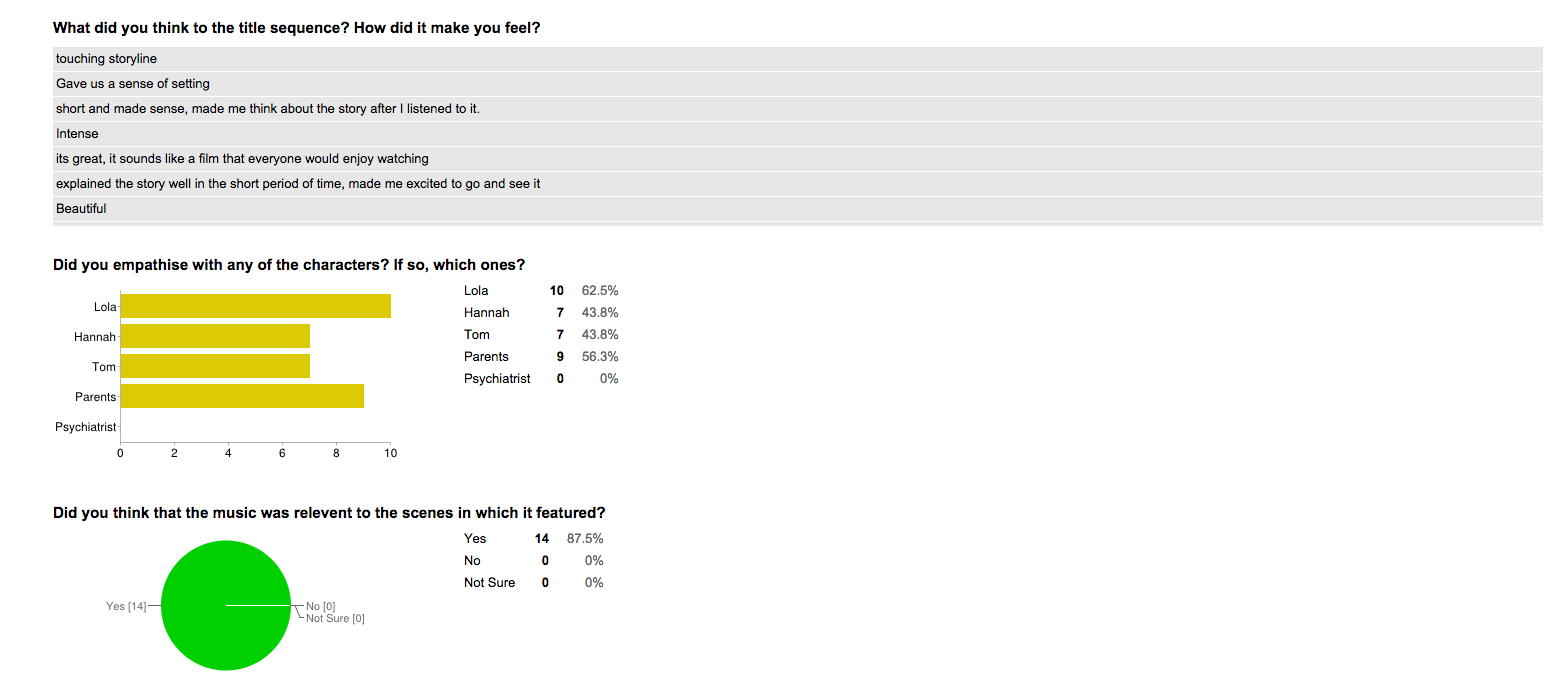
For question four we got a variety of different answers, but all the answers are very generous. This question asked the audience to give their opinion on how the title sequence made them feel, and all the answers were positive which is great because it means they have enjoyed watching it and not boring.
The fifth question got alot of mix opinions of who the audience sympathised with, most people chose Lola and the parents, which makes sense because we tried to make the audience have a connection with Lola from making the story from her point of view and giving her a likeable character.
Everyone said yes for the sixth question which was if the music matched the scenes, it took us a while to find suitable songs that would reflect the right emotion on the scenes and again its made us really happy looking a these responses and seeing that the audience agreed with our choices.

For the eighth question most people understood hannah's role in the film and a small percentage mostly understood which is great, because we were unsure on wether or not we portrayed her well, and the flashbacks at the end were abit confusing, so the responses were relieving knowing that the audience understood her.
Everyone say yes for the question 9, which was if they liked the cliffhanger at the end, we really struggled to portray the cliffhanger but the fact that the audience liked it and got it made us really happy knowing it was worth the struggle.

Thursday, 5 March 2015


Friday, 30 January 2015
Issues encountered during editing
Issues Encountered During Editing
We all came across issues such as realising that there were some shots missing or that needed to be added on so that there would be continuity in our film, we realised there were shots missing once we had put all the shots together so therefore we had to go out and do those shots. Also when editing we would realise that some props places had changed in some shots or the characters costume would look different so we had to redo those shots again,
Durig the filming procedure we filmed our shots in random order depending on which location we were filming in first and because of that while editing we came across problems such as the time of day, as one shot would be dark because it was shot in the winter afternoon and another shot would be sunny and because of this we had to edit those shots and change the colour format to not make it seem that obvious.
One big issue that we came across once our rough copy was done and posted on youtube, was that we realised 2 shots were not in focus however it had looked focused on the software before we posted it out so now we're going to re shoot those two shots to create a successful film.
Monday, 26 January 2015
Research into editing techniques
Research into editing techniques
EDITING
Editing describes the relationship between shots and the process by which they are combined. It is essential to the creation of narrative space and to the establishment of narrative time. The relationship between shots may be graphic, rhythmic, spatial and/or temporal.
Filmmakers and editors may work with various goals in mind. Traditionally, commercial cinema prefers the continuity system, or the creation of a logical, continuous narrative which allows the viewer to suspend disbelief easily and comfortably. Alternatively, filmmakers may use editing to solicit our intellectual participation or to call attention to their work in a reflexive manner.
Filmmakers and editors may work with various goals in mind. Traditionally, commercial cinema prefers the continuity system, or the creation of a logical, continuous narrative which allows the viewer to suspend disbelief easily and comfortably. Alternatively, filmmakers may use editing to solicit our intellectual participation or to call attention to their work in a reflexive manner.
Graphic Match
Graphic matches, or match cuts, are useful in relating two otherwise disconnected scenes, or in helping to establish a relationship between two scenes. By ending one shot with a frame containing the same compositional elements (shape, color, size, etc.) as the beginning frame of the next shot, a connection is drawn between the two shots with a smooth transition.
The first clip below, from Hitchcock’s Psycho, takes place just after a woman is brutally stabbed to death while in the shower. As her blood washes away down the drain with the water, the camera slowly zooms in on just the drain itself. A graphic match cut is then utilized, as the center of the drain becomes the iris of the victim’s lifeless left eye.
Rhythm
Rhythm editing describes an assembling of shots and/or sequences according to a rhythmic pattern of some kind, usually dictated by music. It can be narrative, as in the clip from Woody Allen’s Bananas below, or, a music video type collage, as in the second clip from Sofia Coppola’s Marie Antoinette. In either case, dialogue is suppressed and the musical relationship between shots takes center stage.
In Allen’s Bananas, the use of a vaudeville-esque tune recalls Charlie Chaplin and early cinematic comedy. Like Chaplin’s characters, Fielding Melish’s actions and adventures continually result in humorous misadventure. In the sequence below, he heroically expels two thugs from a subway car. The length of the shots is determined by the quick tempo of the piano recording: as the villains’ abuse of innocent passengers reaches a climax, the shots become shorter and shorter. The quick editing builds suspense before the hero unpredictably rises and throws them off the train.
Establishing Shot
The Establishing Shot or sequence serves to situate the audience within a particular environment or setting and/ or to introduce an important character or characters. The establishing shot is usually the first or the first few shots in a sequence, and as such, it must be very efficient in portraying the context. Typically, establishing shots are Extreme Long Shots or Long Shots, followed by progressively closer framing.
Quentin Tarantino introduces his film Inglorious Basterds, with an extreme long shot of the countryside, suggestive of rural France. It is followed by a medium shot of the dairy farmer, who will dominate the first scene. One of the man’s daughters is also shown, first in a medium shot and then in medium close-up, hanging clothes. Moreover, the sequence establishes the central conflict, with the arrival of the German motor cars, shown in POV shots from the perspective of the farmer and his daughter.
Shot/ Reverse Shot
Shot/Reverse Shot is an editing technique that defined as multiple shots edited together in a way that alternates characters, typically to show both sides of a conversation situation. There are multiple ways this can be accomplished, with common examples being over the shoulder shots, angled shots, left/right alternating shots, and often a combination of the three.In the first clip below, from Terry Zwigoff’s Bad Santa, we see a standard over the shoulder SRS. This, combined with eye-line matches between the two main negotiators shows how focused each is on the other. The over the shoulder technique allows the viewer to see the facial expressions of each character while listening or speaking. More importantly, the over the shoulder technique creates a sense of space between the characters greater than the actual distance between them. This keeps the frame from being uncomfortably cramped, and also shows the distance between the characters’ different standpoints.
Eye-line Match
In an eye-line match, a shot of a character looking at something cuts to another shot showing exactly what the character sees. Essentially, the camera temporarily becomes the character’s eyes with this editing technique. In many cases, when the sequence cuts to the eye-line, camera movement is used to imply movement of the character’s eyes. For example, a pan from left to right would imply that the character is moving his/her eyes or head from left to right. Because the audience sees exactly what the character sees in an eye-line match, this technique is used to connect the audience with that character, seeing as we practically become that character for a moment. Each of the following sequences is from No Country For Old Men, directed by the Coen Brothers.In the first clip, five eye-line matches are shown in a sequence that’s only a minute long. The first of these contains movement from left to right, mocking Llewelyn’s motion as he walks up to the dead body. We then see relatively still eye-line matches as Llewelyn looks at man’s face, and then at the gun as he picks it up. The next eye-line match is shown as Llewelyn opens the briefcase of money, which contains a slight zoom. This zoom is not necessarily used to mimic Llewelyn’s eye movement, but rather his thought and emotion, as the sight of all the money understandably “brings him in.” The Coen brothers decided to use so many eye-line matches in this sequence and in the rest of Llewelyn’s journey so that the audience would come closer to experiencing what he was experiencing.
Cut-in and Cut-away
This sequence, taken from Tarantino’s Sukiyaki Western Django (2007) provide an examples of the cut-in. Cut-out or away is the reverse, bringing the viewer from a close view to a more distant one. The sequence opens with an extreme long shot of the area’s landscape, a high-angled tracking shot (probably via helicopter) –giving us a wide panoramic view of the area. A cut suddenly transports the viewer somewhere within the landscape to a medium shot of character lying on the floor in his room.Continuity editing: The Match on Action
Match on Action is an editing technique used in continuity editing that cuts two alternate views of the same action together at the same moment in the move in order to make it seem uninterrupted. This allows the same action to be seen from multiple angles without breaking its continuous nature. It fills out a scene without jeopardizing the reality of the time frame of the action.In the first scene above, Peter Jackson uses matches on action to give the chase a sense of dynamism. The viewer can never assume what is going to happen next, as the scene is constantly shifting. He uses a very complex version of match on action, jumping from close ups to far away helicopter shots and back without a pause. It is almost dizzying, yet thrilling at the same time. Be sure to keep your eye on the white horse; this is the character we are following and although hard to see at times it is present in every part of the clip.
Parallel Editing
Parallel editing is a technique used to portray multiple lines of action, occurring in different places, simultaneously. In most but not all cases of this technique, these lines of action are occurring at the same time. These different sequences of events are shown simultaneously because there is usually some type of connection between them. This connection is either understood by the audience throughout the sequence, or will be revealed later on in the movie. The first clip is from No Country For Old Men directed by the Coen Brothers, and the second is from Batman: The Dark Knight directed by Christopher Nolan.In this first clip, we see parallel editing used primarily to add suspense to the situation. At first, the intervals between showing Lewelyn and Anton are relatively long, but as they shorten later on in the sequence, additional suspense is added. Just as we see in the previous clips from the film, there are many eye-line matches shown for both of the characters. This combination of parallel editing and eye-line matches for each line of action allows the viewer to practically experience both sides of the event first-hand.
Alternative transitions
Superimposition
Th following sequence is an example of superimposition. Superimposition refers to the process by which frames are overlapped, either mechanically or digitally, in order to achieve a layered transition. Japanese cinema sometimes uses traditional “kanji” calligraphy superimposed over standard film in several ways; the first of these being to illustrate a famous quotation or religious koan (a phrase chanted to bring about enlightenment), such as this example in which Tarantino says the Japanese proverb, “life is all about goodbyes” (サヨナラだけが人生だ) with the same words superimposed over the screen.Fade -in
In this sequence from Sukiyaki Western Django, the calligraphic message provides an example of the fade-in. The style used in “Sukiyaki Western Django” is reminiscent of filmmakers such as Kurosawa, who used this archaic writing technique to embed a sort of traditionalism into his media. All in all, this effect has the added value of reminding us that though we are watching a Western, there is a Japanese component that underlies all the events of the film, and we cannot forget this in sight of the lush mise en scène that encompasses the entirety of the piece.ALTERNATIVES TO THE CONTINUITY SYSTEM
In-Camera Editing
Long Take
Long takes are simply shots that extend for a long period of time before cutting to the next shot. Generally, any take greater than a minute in length is considered a long take. Usually done with a moving camera, long takes are often used to build suspense or capture the attention of audience of without breaking their concentration by cutting the film.The opening scene from Robert Zemeckis’ Forrest Gump follows a feather blowing carefree in the wind, eventually landing on the foot of the protagonist who proceeds to pick it up and place it in his suitcase. This scene acts as a metaphor for the whole movie, as the feather represents Forrest. Just as the feather blows around for what seems like forever, just going where the wind takes it until it eventually lands in a safe place, Forrest seems to just blow aimlessly through life, going wherever life and fate may take him with out too much consideration of his own, until he eventually lands in a happy place.
Jump-Cut
A Jump-Cut is an example of the elliptical style of editing where one shot seems to be abruptly interrupted. Typically the background will change while the individuals stay the same, or vice versa. Jump-cuts stray from the more contemporary style of continuity editing where the plot flows seamlessly to a more ambiguous story line. An example of this editing style can be found in the following clips from Capote (2005).
Associative Editing or “Montage”
The following clip is taken from Sergei Eisenstein’s Battleship Potemkin. This unique combination of shots shows a marble lion reacting to the sailors’ rebellion in the harbor. In the context of the story, the ship opens fire on Cossack reinforcements sent to quell its revolt. Eisenstein integrates lions sculpted in various postures to suggest that all of Moscow is awakening to the people’s cause. The sequence requires the viewer to interpret, to “read” the metaphor inherent in the statues and to derive a meaning from their presence in the diegesis.Hollywood-style Montage
Montage also describes the approach used in commercial cinema to piece together fragments of different yet related images, sounds/music, often in the style of a music video. The following sequence, from Pretty Woman (1991), is an example of the hollywood style montage. The film, starring Richard Gere and Julia Roberts, shows the main character Vivienne as she transitions from a scantily-clad, unrefined hooker, into Edward’s elegant, poised and well-dressed companion. The soundtrack plays over the background as snippets of various clothing and body parts are shown. In the concluding frame of sequence, the final product, the “new Vivienne”, approaches the camera in a white, tailored outfit and a ladylike hat.
Sunday, 25 January 2015
Indivisual research into Viral Ad's
What is a viral ad?
On the Internet, viral marketing is any marketing technique that induces Web sites or users to pass on a marketing message to other sites or users, creating a potentially exponential growth in the message's visibility and effect. Viral ad's are good ways of promoting and advertising messages in a unique way which will appeal to the target audience, also, if a large number of participants exchange clips of the viral message it will generate a wide range response which is why viral ads are so popular amongst different companies.
What makes a good viral ad?
Some viral marketing strategies work better than others. Few work as well as the simple Hotmail.com strategy. But below are the six basic elements you hope to include in your strategy. A viral marketing strategy need not contain ALL these elements, but the more elements it embraces, the more powerful the results are likely to be. An effective viral marketing strategy:
Advantages of viral marketing
A viral campaign can be used to build or enhance brand awareness, reputation and image. They can also communicate a specific message in a way that is easy to understand as well as being enjoyable. This encourages users to send the campaign to their friends. Due to the huge amount of visitors a viral campaign can receive, advertisers can generate massive publicity for new product releases and it also helps to gather data and contact details of potential customers.
Undoubtedly, the combinations of different marketing strategies whose objectives are focused on achieving engagement with our audience have their most convincing proof of efficiency in increasing traffic. Viral marketing is one of the most efficient strategies to raise awareness our brand and attract customers.
Other advantages are; better visibility and eventually it cuts down your promotional costs as the publicity of the viral ad will gain more credibility than using a variety of advertising methods.
Disadvantages of viral ads
However, there can be downsides to viral marketing. Some of these are; Negative buzz-Sometimes, instead of creating a positive buzz about your business, viral marketing works in the opposite way. Human nature being what it is, people are more likely to talk about something they don't like with their friends, family members, and co-workers than to share something positive, Greater awareness of your business can lead to more spam, You don't control what people say about your business in social sites.
Examples of viral advertising
Above I have attached 3 unique viral ad examples of films. Chucky, James Bond Skyfall and Carrie.
On the Internet, viral marketing is any marketing technique that induces Web sites or users to pass on a marketing message to other sites or users, creating a potentially exponential growth in the message's visibility and effect. Viral ad's are good ways of promoting and advertising messages in a unique way which will appeal to the target audience, also, if a large number of participants exchange clips of the viral message it will generate a wide range response which is why viral ads are so popular amongst different companies.
What makes a good viral ad?
Some viral marketing strategies work better than others. Few work as well as the simple Hotmail.com strategy. But below are the six basic elements you hope to include in your strategy. A viral marketing strategy need not contain ALL these elements, but the more elements it embraces, the more powerful the results are likely to be. An effective viral marketing strategy:
- Gives away products or services;
- Provides for effortless transfer to others;
- Scales easily from small to very large;
- Exploits common motivations and behaviour's;
- Utilizes existing communication networks;
- Takes advantage of others’ resources.
Advantages of viral marketing
A viral campaign can be used to build or enhance brand awareness, reputation and image. They can also communicate a specific message in a way that is easy to understand as well as being enjoyable. This encourages users to send the campaign to their friends. Due to the huge amount of visitors a viral campaign can receive, advertisers can generate massive publicity for new product releases and it also helps to gather data and contact details of potential customers.
Undoubtedly, the combinations of different marketing strategies whose objectives are focused on achieving engagement with our audience have their most convincing proof of efficiency in increasing traffic. Viral marketing is one of the most efficient strategies to raise awareness our brand and attract customers.
Other advantages are; better visibility and eventually it cuts down your promotional costs as the publicity of the viral ad will gain more credibility than using a variety of advertising methods.
Disadvantages of viral ads
However, there can be downsides to viral marketing. Some of these are; Negative buzz-Sometimes, instead of creating a positive buzz about your business, viral marketing works in the opposite way. Human nature being what it is, people are more likely to talk about something they don't like with their friends, family members, and co-workers than to share something positive, Greater awareness of your business can lead to more spam, You don't control what people say about your business in social sites.
Examples of viral advertising
Above I have attached 3 unique viral ad examples of films. Chucky, James Bond Skyfall and Carrie.
Shooting schedule and resources
Shooting schedule
On Friday the 14th of November 2014 we began filming our title sequence. It took in total about 1 hour to produce all the shots. It wasn't necessary to re-film any of our title sequence because we were all very happy with the outcome and feel that it looked good. Below, I have attached a rough copy of our title sequence which we produced and edited by December 2nd 2014. The title sequence itself will be using in our film, however, the shots used in the opening scene will not be used as we have re-filmed the whole scene with better shots.
We first began shooting the film on the 21st of November 2014 in the Health and Social room on the 2nd floor in Barnsley college. This scene was used to film the 'hospital scene' in which Lola first wakes up and sneaks out with Hannah. The room is set out with two hospital beds and a bedside table, however, we brought our own props to make it look more like hospital to add a sense of realism to our film and ensure it looks quite professional. However, after we filmed this and watched the footage back when editing it on Final cut express, we all decided as a group that although some of the shots were really good, for example the extreme close up of the eyes, we felt that we needed to re-film the scene again to ensure that we were happy with it. We began to re-film the same scene on the 3rd of December 2014 however, we did not have enough time to complete the whole scene so we finished off the filming on Friday 12th of December 2014, we also managed to film the stairs scene on this day which took us approximately 30minutes to film. I then took the camera equipment back to my house so we could film of the home scenes over the Christmas period.

On the 2nd of January we began filming the home scenes. We planned of filming these earlier however we had some setbacks which made us unable to do so, e.g.; snow on the ground, some members of the group ill and some members of the group at work. On the 2nd we managed to film the scene at Lola's house, the scene outside Tom's house, the scene when Lola goes to Hannah's house and the flashback scenes. Due to all the unfortunate circumstances of not being able to film on any other day, we were put under pressure to get all the scenes filmed with Demi on that 1 day. This is because Demi was dying her hair from blonde to brown on the 3rd of January. Unfortunately, the wind was really bad therefore we were unable to film much outside, this is why we slightly changed the storyline so instead of Lola and Hannah arguing outside Toms, We changed it so Lola went to Toms alone and then went to Hannah's house so the confrontation between both girls could take place indoors where the sound was a lot clearer. Putting aside all the set-backs, we were able to successfully complete all the shots on that day and when watching them back, we were all very pleased.


On Friday the 14th of November 2014 we began filming our title sequence. It took in total about 1 hour to produce all the shots. It wasn't necessary to re-film any of our title sequence because we were all very happy with the outcome and feel that it looked good. Below, I have attached a rough copy of our title sequence which we produced and edited by December 2nd 2014. The title sequence itself will be using in our film, however, the shots used in the opening scene will not be used as we have re-filmed the whole scene with better shots.
We first began shooting the film on the 21st of November 2014 in the Health and Social room on the 2nd floor in Barnsley college. This scene was used to film the 'hospital scene' in which Lola first wakes up and sneaks out with Hannah. The room is set out with two hospital beds and a bedside table, however, we brought our own props to make it look more like hospital to add a sense of realism to our film and ensure it looks quite professional. However, after we filmed this and watched the footage back when editing it on Final cut express, we all decided as a group that although some of the shots were really good, for example the extreme close up of the eyes, we felt that we needed to re-film the scene again to ensure that we were happy with it. We began to re-film the same scene on the 3rd of December 2014 however, we did not have enough time to complete the whole scene so we finished off the filming on Friday 12th of December 2014, we also managed to film the stairs scene on this day which took us approximately 30minutes to film. I then took the camera equipment back to my house so we could film of the home scenes over the Christmas period.
On the 2nd of January we began filming the home scenes. We planned of filming these earlier however we had some setbacks which made us unable to do so, e.g.; snow on the ground, some members of the group ill and some members of the group at work. On the 2nd we managed to film the scene at Lola's house, the scene outside Tom's house, the scene when Lola goes to Hannah's house and the flashback scenes. Due to all the unfortunate circumstances of not being able to film on any other day, we were put under pressure to get all the scenes filmed with Demi on that 1 day. This is because Demi was dying her hair from blonde to brown on the 3rd of January. Unfortunately, the wind was really bad therefore we were unable to film much outside, this is why we slightly changed the storyline so instead of Lola and Hannah arguing outside Toms, We changed it so Lola went to Toms alone and then went to Hannah's house so the confrontation between both girls could take place indoors where the sound was a lot clearer. Putting aside all the set-backs, we were able to successfully complete all the shots on that day and when watching them back, we were all very pleased.
This picture was taken whilst filming the 'home scene' at Lola's.
On Wednesday 14th January 2015, we filmed the final scene with Tom and the psychiatrist and also we used a zoom recorder to record Tom's voice over and got all the scenes with Tom in done on that day. However, another setback occurred when filming. Demi's sister, Jade Cash who was supposed to be playing the psychiatrist was unable to participate in the film making so we was an actress short. However, at the last minute, my sister, Amy Shutt volunteered to play the psychiatrist and we managed to get it filmed that day.
On Friday 16th January 2015, we filmed the 'accident scene' where Lola walks past the accident scene on her way to Toms and also the scene where the accident took place when Hannah pushes Lola into the road and she gets hit by a car. It took us about 1 hour to film these two scenes as it began to rain so we had to take the camera somewhere sheltered until it stopped.
This a picture to show the resources we took out to film on that particular day. We have the camera and the tripod. I looked at the weather forecast and it was forecast to rain that day so we were aware therefore I brought a large golfing umbrella to protect the camera and also a UV torch to flash into Lola's face to make it look like a headlight was hitting it.
On Friday 23rd of January 2015 we completed our final bit of filming which was in the same hospital scene we filmed for the beginning of the film. We also did some extra shots in which Lola is stumbling down the corridor making her way to the hospital room, including some point of view shots. In total, it took us approximately 4 hours to complete this scene.
This week, we are focusing on editing all our shots and creating a 'rough copy' of the film by the latest Friday 30th of January 2015. Therefore, we can then share a copy of this to friends/family and ask them to suggest improvements in which we can add to our final draft.
Saturday, 24 January 2015
Behind the scenes- Filming of Lola
We have a deadline to complete a rough copy of our short film by Friday 30th January. We have filmed all the scenes we needed to so far and this week we will focus on editing it all. Throughout the filming, we have taken varies pictures/videos to show what it has been like making the film and how our teamwork has enabled us to work together and successfully complete all tasks at hand.
Makeup


Using the Camera
We have all helped to film, taking turns using the camera and consoling with each other after each shot in order to ensure we were all happy with what we had filmed. We felt confident enough to use the bigger A2 cameras last year when filing our AS video therefore we felt a lot more confident using them again this year allowing us to experiment more.


Rehearsing the shots
Due to me and Demi being in most of the shots, we didn't have to
opportunity to see how each shot would look when filming, therefore we took it in turns to act out in each frame so we all had an idea of how the shot would look when filming it for real.

Makeup
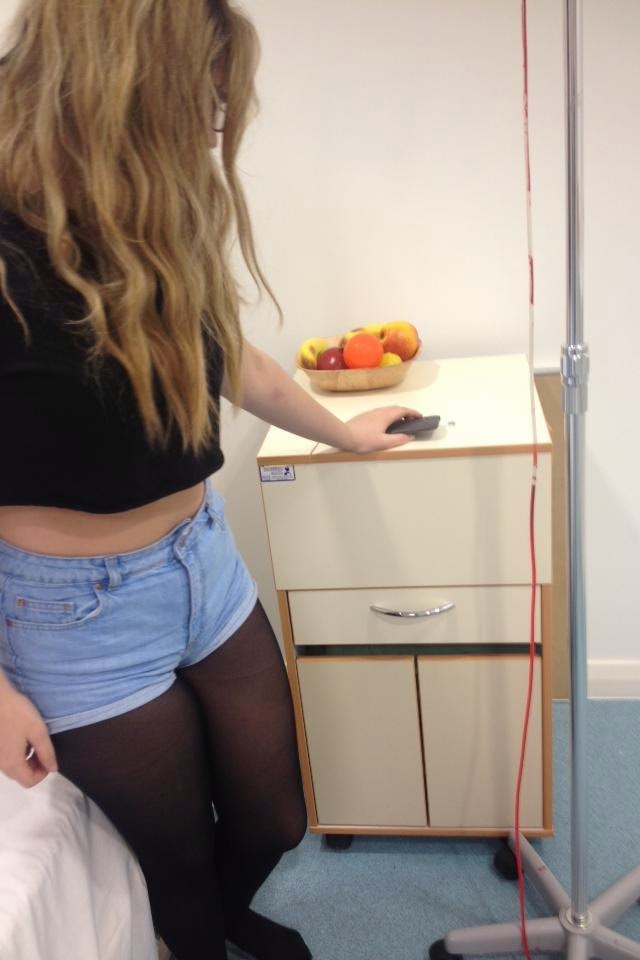
To achieve a 'unwell' look for the character Lola, Selen applied red, brown and grey eye shadow under my eyes to make them look drained and hollow. She also applied brown blusher to my cheekbones in order to exaggerate my facial shape and by enhancing the cheekbones it implied that Lola is fragile.
Using the Camera
We have all helped to film, taking turns using the camera and consoling with each other after each shot in order to ensure we were all happy with what we had filmed. We felt confident enough to use the bigger A2 cameras last year when filing our AS video therefore we felt a lot more confident using them again this year allowing us to experiment more.

Rehearsing the shots
Due to me and Demi being in most of the shots, we didn't have to
opportunity to see how each shot would look when filming, therefore we took it in turns to act out in each frame so we all had an idea of how the shot would look when filming it for real.

 |
Thursday, 22 January 2015
How to make our film look more professional
When creating a film, you want it to look professional and of good quality, which is why I decided to do some research into how we can achieve this in order to reflect what I have learnt and found out and apply it to our film.
1) Trim it
The first thing I found out is that unnecessary shots make the audience less interested and makes the film seem slightly tedious, so the best thing to do is trim the shot down to only what is needed. Any basic editing software has a trim tool and as we are using Final Cut Express to edit our film, we are all perfectly aware of where the 'cut' tool is. We became familiar with this software as we used it last year when creating a 2 minute introduction to a film therefore we feel a lot more confident using it this year.

The cut button is located in the tool pallet which has been highlighted in a black oval shape.
2) Attach a logo
The second tip I found to making your film look more professional was to add a stamp/logo. As a group, we created a Logo for our film, however, in our rough draft of our film, we did not attach the logo to it. Therefore, as a result of this research in our final copy of our film, we will include our logo amongst the title sequence which will help the audience to identify with our film.

Here I have included our logo which will be featured in our film. This was created on Photoshop and we used a drawing pad free-handed to transfer it onto the computer.
3) Colour correction
Colour correction is a very important when ensuring your film looks of a professional quality.While many see colour correction as a simple way to fix problems with the original footage, there’s a lot more to it than that. Colour correction can perform real magic on any project, no matter what the final output is. From broadcast shows and independent movies, to DVDs and streaming videos, colour correction is the perfect technique to not only make the final video look outstanding but also to give new meaning to certain scenes. Adopting colour correction as one of the necessary steps in your postproduction sessions can make such a difference in the final results that you may soon find your productions rising to a whole new level, taking you several steps ahead of the competition. Already, we have used this technique in our rough copy of our film. In one of the shots, the lighting outside was slightly darker which created a blue filter on the frame which we did not want. Using the colour corrector, we was able to match it to the next frame which allowed us to edit continuously thus enabling us to achieve e a more professional looking scene.

Here we can see what a difference colour correction can actually make and how many different effects it can achieve.
4) Depth of focus
The final thing I concluded as part of my research is the importance of the depth of field. At first, I didn't quite understand what this was, however, after looking more into it I found that it is
the amount of distance between the nearest and farthest objects that appear in acceptably sharp focus in a photograph. A preferred selection Depth of field in a focused subject in an image can be quite subjective. So, why is this so important? Using this method you can direct the focus of your audience toward whatever element you desire to showcase. Thus subconsciously telling them “this is important.” It is also important to ensure the DOF does not create a 'muddy' effect in which someone shoots wide open and part of the subject is out of focus.


1) Trim it
The first thing I found out is that unnecessary shots make the audience less interested and makes the film seem slightly tedious, so the best thing to do is trim the shot down to only what is needed. Any basic editing software has a trim tool and as we are using Final Cut Express to edit our film, we are all perfectly aware of where the 'cut' tool is. We became familiar with this software as we used it last year when creating a 2 minute introduction to a film therefore we feel a lot more confident using it this year.
The cut button is located in the tool pallet which has been highlighted in a black oval shape.
2) Attach a logo
The second tip I found to making your film look more professional was to add a stamp/logo. As a group, we created a Logo for our film, however, in our rough draft of our film, we did not attach the logo to it. Therefore, as a result of this research in our final copy of our film, we will include our logo amongst the title sequence which will help the audience to identify with our film.
Here I have included our logo which will be featured in our film. This was created on Photoshop and we used a drawing pad free-handed to transfer it onto the computer.
3) Colour correction
Colour correction is a very important when ensuring your film looks of a professional quality.While many see colour correction as a simple way to fix problems with the original footage, there’s a lot more to it than that. Colour correction can perform real magic on any project, no matter what the final output is. From broadcast shows and independent movies, to DVDs and streaming videos, colour correction is the perfect technique to not only make the final video look outstanding but also to give new meaning to certain scenes. Adopting colour correction as one of the necessary steps in your postproduction sessions can make such a difference in the final results that you may soon find your productions rising to a whole new level, taking you several steps ahead of the competition. Already, we have used this technique in our rough copy of our film. In one of the shots, the lighting outside was slightly darker which created a blue filter on the frame which we did not want. Using the colour corrector, we was able to match it to the next frame which allowed us to edit continuously thus enabling us to achieve e a more professional looking scene.
Here we can see what a difference colour correction can actually make and how many different effects it can achieve.
4) Depth of focus
The final thing I concluded as part of my research is the importance of the depth of field. At first, I didn't quite understand what this was, however, after looking more into it I found that it is
the amount of distance between the nearest and farthest objects that appear in acceptably sharp focus in a photograph. A preferred selection Depth of field in a focused subject in an image can be quite subjective. So, why is this so important? Using this method you can direct the focus of your audience toward whatever element you desire to showcase. Thus subconsciously telling them “this is important.” It is also important to ensure the DOF does not create a 'muddy' effect in which someone shoots wide open and part of the subject is out of focus.
Here I have attached a good example of a muddy shot which was taken from the them 'abortion'.
When you really think about it, DOF is just another framing edge. Just like left, right, top, and bottom of the frame can be used to isolate the scene; DOF can be used to control how deep a scene is. This gives the cinematographer the option to limit space. Take for example a car park. In reality it may be a large space, using shallow depth of field one can create a very small, intimate scene with a character.
Here I have attached an Image which displays a good depth of focus which we will try to re-create in our film in order to achieve a more professional feel.
5) Youtube links on how to use editing software
I have also attached some links to some Youtube videos which show how to create a more professional look when editing with popular editing software which has also proven useful when editing our short film 'Lola'.
Tuesday, 30 December 2014
Research into radio trailers
What is a radio trailer?
A radio trailer is an audio advertisement and its purpose is to promote and sell. Typically, a radio trailer for a film includes dialogue from the film, a narrative, music from the film and sound effects from the film, ultimately giving the audience an incite to the film and delivering it on a more personal level.
Eric Chase sets a good example of what great radio trailers should sound like. He helps to create a gripping, intense and attention grabbing radio trailer which makes you want to drop what you're doing and go and watch the films he is advertising. Eric Chase Creative Services produces award-winning, results-oriented, high-impact audio and audio-for-video. Theme Parks, Major Retailers, Satellite Networks, Top Casinos, Nightclubs and Media Outlets are reaping the rewards of ECCS produced spots.
Click here to go to the Eric Chase services website and listen to some of his trailers
Preparation and planning for our radio trailer
After researching into radio trailers and looking at examples from Eric Chase's website, I decided what I would like our film trailer to sound like and it has given me a good idea to what a good radio trailer should be like. When selecting an actor/actress to narrate the film for the trailer, we need to ensure that they have a powerful voice in which they can confidently project to the audience. The actor/actress must also get a feel for the film, and feel that they can emotionally connect with it. This will then reflect itself when listening back to the trailer. With the proper ability to tell a story the audience will fully engrossed in the feature and the intended job of the production will be a success. We already have a actor in mind and this is Danny Milne who also stars as Tom in our film as we feel he can meet the suitable criteria and ultimately help produce a perfect, gripping radio trailer.
Other things we need to take into consideration when producing our radio trailer is we need to include snippets of dialogue from our film. This means that we'll need the dialogue of the main characters e.g.; Lola, Hannah, Tom... Also, we will need to include key sound effects to help build up an atmosphere so these will include sounds such as the oxygen mask, car breaks, screams, sirens... All of which will give the audience an incite to what the film is about without giving too much away.
A radio trailer is an audio advertisement and its purpose is to promote and sell. Typically, a radio trailer for a film includes dialogue from the film, a narrative, music from the film and sound effects from the film, ultimately giving the audience an incite to the film and delivering it on a more personal level.
Eric Chase sets a good example of what great radio trailers should sound like. He helps to create a gripping, intense and attention grabbing radio trailer which makes you want to drop what you're doing and go and watch the films he is advertising. Eric Chase Creative Services produces award-winning, results-oriented, high-impact audio and audio-for-video. Theme Parks, Major Retailers, Satellite Networks, Top Casinos, Nightclubs and Media Outlets are reaping the rewards of ECCS produced spots.
Click here to go to the Eric Chase services website and listen to some of his trailers
Preparation and planning for our radio trailer
After researching into radio trailers and looking at examples from Eric Chase's website, I decided what I would like our film trailer to sound like and it has given me a good idea to what a good radio trailer should be like. When selecting an actor/actress to narrate the film for the trailer, we need to ensure that they have a powerful voice in which they can confidently project to the audience. The actor/actress must also get a feel for the film, and feel that they can emotionally connect with it. This will then reflect itself when listening back to the trailer. With the proper ability to tell a story the audience will fully engrossed in the feature and the intended job of the production will be a success. We already have a actor in mind and this is Danny Milne who also stars as Tom in our film as we feel he can meet the suitable criteria and ultimately help produce a perfect, gripping radio trailer.
Other things we need to take into consideration when producing our radio trailer is we need to include snippets of dialogue from our film. This means that we'll need the dialogue of the main characters e.g.; Lola, Hannah, Tom... Also, we will need to include key sound effects to help build up an atmosphere so these will include sounds such as the oxygen mask, car breaks, screams, sirens... All of which will give the audience an incite to what the film is about without giving too much away.
Thursday, 27 November 2014
Analysis of a film poster
The Butterfly effect

The most important part of a film poster is it needs to stand out and grab the audiences attention and encourage them to take a closer look at the poster and show interest in the film. By using the films characters or major plot line designers can establish some level of plot while gaining the attention of any person that views the poster. This is what makes this particular film poster stand out. Both main characters are visible in the poster and the close ups of their faces adds tension and creates a intense and powerful atmosphere. The blue filter makes the film seem quite eerie and cold, giving the audience the impression that there is something to be revealed in the film which is possibly quite unpleasant. The red eye effect used on Ashton Kutcher also foreshadows the plot of the film as he can travel back in time and has visions. This is particularly effective as the red and blue contrast well together and ultimately make the poster stand out, which shows us that the imagery used does not need to be provocative or flashy to attract the audiences attention.
The most effective movie posters are iconic, presenting the themes in the world without resorting to saying flat out what it is. The iconography in this poster which really stands out is the red eye effect as it simply establishes the films plot. The close up of Ashton is also iconic in the way that the audience automatically have a idea that he is the main character in the film. This effect this has is it allows the film to be marketed to casual observers and drama fans all at once, all through imagery.
The protagonist in the poster is looking directly into the camera which could make the audience feel more involved and feel like the main character is directly addressing them. This is a particularly effective selling point in the film as it is a more personal way of advertising and selling the film to the target audience.
The female protagonists face is looking away from both us and from Ashton and we, as the audience, feel we are viewing her from the same character perspective of Ashton, ultimately giving us an incite on Ashton's character perspective. If I was to determine a target audience for this film basing my opinion on only the film poster, I would think that it is aimed at 12+, my reasons for this are; the main characters looks quite young which implies that it's aimed at a similar type of audience and from the poster, I assume the film is a drama genre and most drama genres have target audiences of 12/15. The film poster itself has a basic layout which means that it's easier to analyse as there isn't too much going on. I think what is particularly effective is the way the text has been used as a border as it looks quite unusual and unique. I think the simplicity and subtleness of this film poster makes is stand out and gives it a unique selling point which I think is why it was as successful as it was in the blockbuster office.
The most important part of a film poster is it needs to stand out and grab the audiences attention and encourage them to take a closer look at the poster and show interest in the film. By using the films characters or major plot line designers can establish some level of plot while gaining the attention of any person that views the poster. This is what makes this particular film poster stand out. Both main characters are visible in the poster and the close ups of their faces adds tension and creates a intense and powerful atmosphere. The blue filter makes the film seem quite eerie and cold, giving the audience the impression that there is something to be revealed in the film which is possibly quite unpleasant. The red eye effect used on Ashton Kutcher also foreshadows the plot of the film as he can travel back in time and has visions. This is particularly effective as the red and blue contrast well together and ultimately make the poster stand out, which shows us that the imagery used does not need to be provocative or flashy to attract the audiences attention.
The most effective movie posters are iconic, presenting the themes in the world without resorting to saying flat out what it is. The iconography in this poster which really stands out is the red eye effect as it simply establishes the films plot. The close up of Ashton is also iconic in the way that the audience automatically have a idea that he is the main character in the film. This effect this has is it allows the film to be marketed to casual observers and drama fans all at once, all through imagery.
The protagonist in the poster is looking directly into the camera which could make the audience feel more involved and feel like the main character is directly addressing them. This is a particularly effective selling point in the film as it is a more personal way of advertising and selling the film to the target audience.
The female protagonists face is looking away from both us and from Ashton and we, as the audience, feel we are viewing her from the same character perspective of Ashton, ultimately giving us an incite on Ashton's character perspective. If I was to determine a target audience for this film basing my opinion on only the film poster, I would think that it is aimed at 12+, my reasons for this are; the main characters looks quite young which implies that it's aimed at a similar type of audience and from the poster, I assume the film is a drama genre and most drama genres have target audiences of 12/15. The film poster itself has a basic layout which means that it's easier to analyse as there isn't too much going on. I think what is particularly effective is the way the text has been used as a border as it looks quite unusual and unique. I think the simplicity and subtleness of this film poster makes is stand out and gives it a unique selling point which I think is why it was as successful as it was in the blockbuster office.
Subscribe to:
Posts (Atom)